Module Federation 이란?

JavaScript 아키텍처 유형 중 하나로 단일 Webpack 빌드에 포함된 모듈뿐만 아니라 여러 서버에 배포되어 있는 원격 모듈을 하나의 애플리케이션에서 로딩할 수 있는 기능입니다
Webpack 5 부터 코어로 추가 되었습니다
- 웹 애플리케이션을 여러 개의 독립적인 모듈로 나누고, 이러한 모듈을 동적으로 로드하거나 언로드할 수 있는 웹 개발 아키텍처의 한 형태입니다. 주로 웹 애플리케이션의 규모가 커지고 복잡해질 때 유용하게 사용됩니다.
- 핵심 개념은 각 모듈이 독립적으로 개발되고 배포될 수 있다는 것입니다. 각 모듈은 자체적으로 독립적으로 동작하며, 필요에 따라 애플리케이션에 동적으로 통합될 수 있습니다. 이는 전체 애플리케이션을 더 작고 관리하기 쉬운 조각으로 나눌 수 있게 해줍니다.
- 이 아키텍처의 장점 중 하나는 각 모듈이 독립적으로 개발될 수 있으므로, 다른 모듈의 변경이나 업데이트가 전체 애플리케이션에 미치는 영향을 최소화할 수 있다는 것입니다. 또한, 필요에 따라 모듈을 동적으로 로딩하고 언로딩할 수 있어서 초기 로딩 속도를 최적화하고 사용자 경험을 향상시킬 수 있습니다.
- Module Federation은 웹 애플리케이션의 확장성과 유연성을 높일 수 있는 강력한 아키텍처 중 하나로 평가되고 있습니다.

용어
- Host : 페이지 로드 중(onLoad 이벤트가 트리거될 때) 처음 초기화되는 Webpack 빌드. Runtime에 Remote를 load 할수 있습니다
- Remote : 또 다른 Webpack 빌드로, 그 일부가 " 호스트 " 에 의해 사용됩니다.
- Bidirectional-hosts (양방향 호스트) : 번들 또는 Webpack 빌드가 호스트 또는 원격으로 작동할 수 있는 경우입니다. 런타임 시 다른 애플리케이션을 사용하거나 다른 애플리케이션에 의해 사용됨니다.
- Omnidirectional-host (전방향 호스트): 호스트 자체는 시작 시 호스트인지 원격인지 알 수 없습니다. 이를 통해 webpack은 호스트 자체 공급업체를 semver 규칙을 기반으로 하는 공급업체로 변경할 수 있습니다. 필요한 경우 여러 버전을 허용합니다.
Module federation 적용 시 기대효과
서비스를 개발하고 성공해 나가다보면 규모가 점점 커질 수 있다. 서비스 규모가 커질수록 작은 변경에도 영향 범위가 커질 수 있으며 영향 범위 예측도 점점 복잡하고 어려워진다. Module Federation은 컨테이너 빌드를 따로 하므로 빌드 시간, 영향 범위, 로딩 시간 측면에서 유리하다.
| 구분 | 기존 방식 | Module Federation 적용 시 기대효과 |
| 빌드범위와 배포시간 | 작은 변경에도 전체 빌드를 하고 배포한다. | 변경된 컨테이너만 빌드하고 배포해서 시간이 줄어든다. |
| 영향도 | 전체 서비스를 대상으로 영향도를 검증한다. | 변경 영향이 해당 컨테이너에 국한되므로 검증 범위도 줄어든다. (단, 원격 모듈의 인터페이스를 변경했다면 호스트 앱도 검증이 필요하다.) |
| 로딩시간 | 전체 빌드가 변경되었으므로 배포 직후 로딩 시간도 오래 걸린다. (브라우저 캐시 적용 안됨) |
배포한 컨테이너의 원격 모듈만 새로 로딩하므로 배포 직후 로딩 시간도 상대적으로 짧다. |
구현
Remote
remote 는 React v18.2.0, Webpack 5 Tailwindcss, Typescript 기반으로 프로젝트 구성을 하였습니다
// Component

import '../../tailwind.css';

export interface NavbarProps {}

const Navbar = () => {
  return (
    <ul className="flex gap-1">
      <li className="flex justify-center items-center border-solid border-b-2">
        <a href="https://www.naver.com">네이버</a>
      </li>
      <li className="flex justify-center items-center border-solid border-b-2">
        <a href="https://google.com">구글</a>
      </li>
      <li className="flex justify-center items-center border-solid border-b-2">
        <a href="https://www.daum.net">다음</a>
      </li>
    </ul>
  );
};

export default Navbar;
// webpack.config.js
const path = require('path');
const { EnvironmentPlugin } = require('webpack');
const HtmlWebPackPlugin = require('html-webpack-plugin');
const { ModuleFederationPlugin } = require('webpack').container;
const deps = require('./package.json').dependencies;
module.exports = (_, argv) => ({
devServer: {
static: { directory: path.resolve(__dirname) },
port: 3000,
hot: true,
},
module: {
rules: [
{
test: /\.m?js/,
type: 'javascript/auto',
resolve: {
fullySpecified: false,
},
},
{
test: /\.(css|s[ac]ss)$/i,
use: ['style-loader', 'css-loader', 'postcss-loader'],
},
{
test: /\.(ts|tsx|js|jsx)$/,
exclude: /node_modules/,
use: {
loader: 'babel-loader',
options: {
presets: [
'@babel/preset-typescript',
['@babel/preset-react', { runtime: 'automatic' }],
'@babel/preset-env',
],
plugins: ['@babel/transform-runtime'],
},
},
},
],
},
plugins: [
new ModuleFederationPlugin({
name: 'remote',
filename: 'remoteEntry.a350ed3e.js',
exposes: {
'./Navbar': './src/components/Navbar/index.tsx',
},
shared: {
...deps,
},
}),
new HtmlWebPackPlugin({
template: './public/index.html',
}),
],
output: {
chunkFilename: '[id].a350ed3e.bundle.js',
publicPath: 'auto',
clean: true,
},
resolve: {
extensions: ['.ts', '.tsx', '.js'],
modules: [path.resolve(__dirname, 'src'), 'node_modules'],
alias: {
'@components': path.resolve(__dirname, 'src/components/index.ts'),
},
},
});
Host
host는 Nextjs SCSS, Typescript 기반으로 구성되어있으며 Remote app을 integration 해보았습니다
// nextjs에서 module federation을 사용하기 위해선 @module-federation/nextjs-mf를 이용해야 합니다
pnpm add -D @module-federation/nextjs-mf
//next.config.js
const NextFederationPlugin = require('@module-federation/nextjs-mf');
/** @type {import('next').NextConfig} */
const nextConfig = {
webpack(config, options) {
const { isServer } = options;
if(!isServer) {
config.plugins.push(
new NextFederationPlugin({
name: 'host',
remotes: {
remote: `remote@http://localhost:4000/remoteEntry.a350ed3e.js`,
},
filename: 'static/chunks/remoteEntry.a350ed3e.js',
}),
);
}
return config;
},
};
module.exports = nextConfig;// Component
import dynamic from "next/dynamic";
const Navbar = dynamic(() => import('remote/Navbar'), { ssr: false, loading: () => <>...loading</>})
export default function Home() {
return (
<div>
hello world
<Navbar />
</div>
);
}동작방식
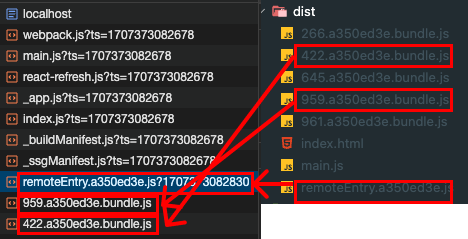
- main.js: 최초에 앱을 초기화하는 역할을 합니다. 가장 상위의 Micro App A의 HTML에서 가장 먼저 불러와지는 청크가기도 합니다. Micro App A의 Container Reference를 가진 청크로, 해당 처리를 해줍니다. 이 외에도 createRoot등, 브라우저에서도 앱을 최초로 초기화하는데 필요한 코드들을 가지고 있습니다.
- remoteEntry.js: Container을 가진 Micro App을 초기화하는 청크입니다. 특정 마이크로 앱에서 다른 Micro App을 import할 때 가장 먼저 불리는 청크가기도 합니다. Micro App B, C의 Container를 가진 청크로, 해당 처리를 해줍니다.
- XXX.js : 이외 청크입니다. 공유 의존성 청크과 Micro App 본문에 대한 청크입니다. main.js, remoteEntry.js내부의 런타임 처리를 통해 로드가 제어됩니다.

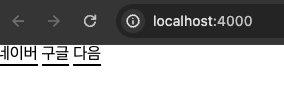
Remote 를 빌드한 이후 Host에서 호출하면 다음과 같이 Runtime Integration 을 하게 됩니다
| Host http://localhost:3000 |
Remote http://localhost:4000 |
Remote build file & Host network call |
 |
 |
 |
참고자료
- https://medium.com/swlh/webpack-5-module-federation-a-game-changer-to-javascript-architecture-bcdd30e02669
- https://martinfowler.com/articles/micro-frontends.html
- https://fe-developers.kakaoent.com/2022/220623-webpack-module-federation/
- https://deview.kr/data/deview/session/attach/%5B116%5DSSR%ED%99%98%EA%B2%BD%EC%97%90%EC%84%9C%EC%9D%98%20Micro-Frontend%20%EA%B5%AC%ED%98%84%EA%B3%BC%20%ED%8D%BC%ED%8F%AC%EB%A8%BC%EC%8A%A4%20%ED%96%A5%EC%83%81%EC%9D%84%20%EC%9C%84%ED%95%9C%20%EC%BA%90%EC%8B%9C%EC%A0%84%EB%9E%B5.pdf
- https://maxkim-j.github.io/posts/module-federation-concepts/
'Frontend' 카테고리의 다른 글
| [React] vite를 이용한 react library 만들기 (4) | 2024.12.30 |
|---|---|
| [React] UnControlled Component (3) | 2024.12.24 |
| [React] ReactFiber와 렌더링 과정 (6) | 2024.12.24 |
| [WEB] 브라우저 렌더링 과정 (0) | 2024.12.23 |
| [React] Polymorphic component (5) | 2024.01.28 |


